
Diese Version von GitHub Enterprise Server wird eingestellt am 2026-04-09. Es wird keine Patch-Freigabe vorgenommen, auch nicht für kritische Sicherheitsprobleme. Für bessere Leistung, verbesserte Sicherheit und neue Features aktualisiere auf die neueste Version von GitHub Enterprise Server. Wende dich an den GitHub Enterprise-Support, um Hilfe zum Upgrade zu erhalten.

Hinzufügen eines Repositorys von deinem lokalen Computer zu GitHub Desktop

Du kannst GitHub Desktop jedes beliebige Git-Repository hinzufügen, selbst wenn es sich nicht um ein GitHub-Repository handelt.

Platform navigation

Tipp

You can add a Git repository from your local computer to GitHub Desktop by dragging the folder onto the GitHub Desktop window. If you drag multiple Git folders into GitHub Desktop at the same time, each folder will be added as a separate Git repository.

  1. In the menu bar, select File, then click Add Local Repository.
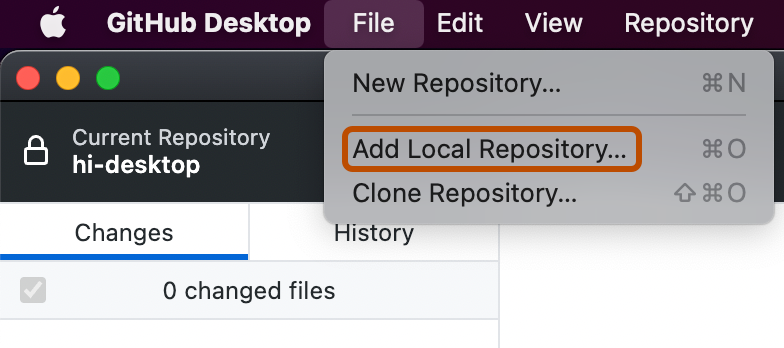
    Screenshot of the menu bar on a Mac. The "File" dropdown menu is open, and an option labeled "Add Local Repository" is outlined in orange.
  2. In the "Add Local Repository" window, click Choose..., then use the Finder window to navigate to the local repository you want to add.
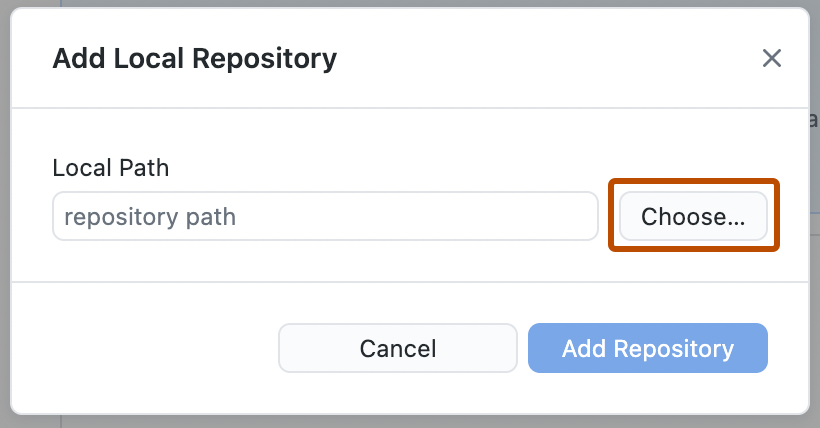
    Screenshot of the "Add Local Repository" window. Next to the "repository path" field, a button, labeled "Choose", is outlined in orange.
  3. When you have chosen the local repository, in the "Add Local Repository" window, click Add Repository.
  1. In the menu bar, select File, then click Add local repository.
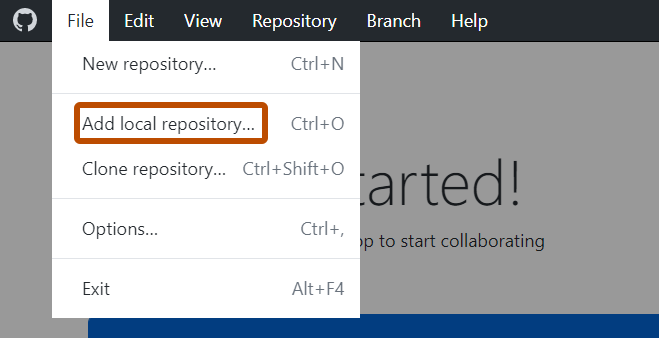
    Screenshot of the menu bar on Windows. The "File" dropdown menu is open, and an option labeled "Add local repository" is outlined in orange.
  2. In the "Add local repository" window, click Choose..., then use Windows Explorer to navigate to the local repository you want to add.
    Screenshot of the "Add local repository" window. Next to the "repository path" field, a button, labeled "Choose", is outlined in orange.
  3. Click Add repository.