
このバージョンの GitHub Enterprise サーバーはこの日付をもって終了となります: 2026-04-09. 重大なセキュリティの問題に対してであっても、パッチリリースは作成されません。 パフォーマンスの向上、セキュリティの向上、新機能の向上を図るために、最新バージョンの GitHub Enterprise サーバーにアップグレードしてください。 アップグレードに関するヘルプについては、GitHub Enterprise サポートにお問い合わせください

ローカルコンピュータからGitHubデスクトップへのリポジトリの追加

GitHubリポジトリでない場合でも、GitHub DesktopにGitリポジトリを追加できます。

Platform navigation

ヒント

You can add a Git repository from your local computer to GitHub Desktop by dragging the folder onto the GitHub Desktop window. If you drag multiple Git folders into GitHub Desktop at the same time, each folder will be added as a separate Git repository.

  1. In the menu bar, select File, then click Add Local Repository.
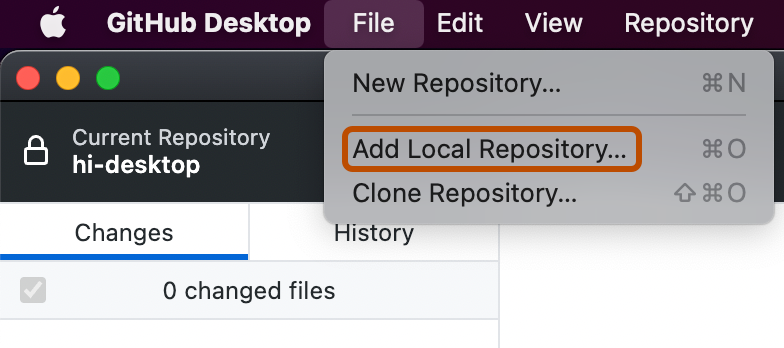
    Screenshot of the menu bar on a Mac. The "File" dropdown menu is open, and an option labeled "Add Local Repository" is outlined in orange.
  2. In the "Add Local Repository" window, click Choose..., then use the Finder window to navigate to the local repository you want to add.
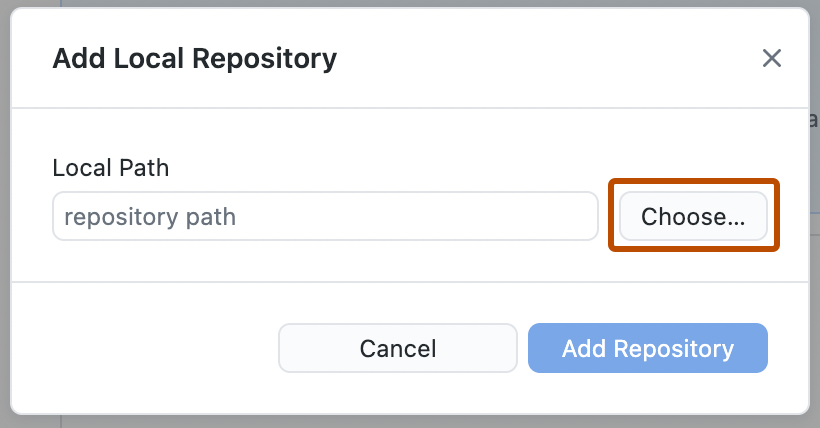
    Screenshot of the "Add Local Repository" window. Next to the "repository path" field, a button, labeled "Choose", is outlined in orange.
  3. When you have chosen the local repository, in the "Add Local Repository" window, click Add Repository.
  1. In the menu bar, select File, then click Add local repository.
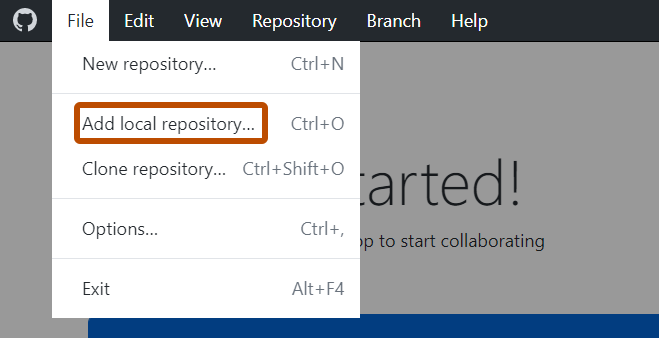
    Screenshot of the menu bar on Windows. The "File" dropdown menu is open, and an option labeled "Add local repository" is outlined in orange.
  2. In the "Add local repository" window, click Choose..., then use Windows Explorer to navigate to the local repository you want to add.
    Screenshot of the "Add local repository" window. Next to the "repository path" field, a button, labeled "Choose", is outlined in orange.
  3. Click Add repository.