After running an initial analysis of your code with default setup, you can make changes to your configuration to better meet your needs. See 关于代码扫描的设置类型.
Customizing your existing configuration of default setup
-
在 GitHub 上,导航到存储库的主页面。
-
在仓库名称下,单击 “Settings”****。 如果看不到“设置”选项卡,请选择“”下拉菜单,然后单击“设置”。

-
在边栏的“Security”部分中,单击“ Code security and analysis”****。
-
In the "CodeQL analysis" row of the "Code scanning" section, select , then click View CodeQL configuration.
-
In the "CodeQL default configuration" window, click Edit.
-
Optionally, in the "Languages" section, select or deselect languages for analysis.
-
Optionally, in the "Query suite" row of the "Scan settings" section, select a different query suite to run against your code.
-
(beta 版本) Optionally, in the "Threat model" row of the "Scan settings" section, select Remote and local sources. This option is only available for repositories with code in a supported language: Java/Kotlin 和 C#.
-
To update your configuration, as well as run an initial analysis of your code with the new configuration, click Save changes. All future analyses will use your new configuration.

Defining the alert severities that cause a check failure for a pull request
You can use rulesets to prevent pull requests from being merged when one of the following conditions is met:
- 某个必需的工具发现了一个 code scanning 警报,且该警报的严重程度符合规则集中的定义。
- 所需的工具分析仍在进行中。
- 未为存储库配置所需的工具。
For more information, see Set code scanning merge protection. For more general information about rulesets, see 关于规则集.
Including local sources of tainted data in default setup
注意
风险模型功能目前为 beta 版本,可能随时更改。 在 beta 版本 期间,风险模型仅支持 Java/Kotlin 和 C# 分析。
If your codebase only considers remote network requests to be potential sources of tainted data, then we recommend using the default threat model. If your codebase considers sources other than network requests to potentially contain tainted data, then you can use threat models to add these additional sources to your CodeQL analysis. During the beta 版本, you can add local sources (for example: command-line arguments, environment variables, file systems, and databases) that your codebase may consider to be additional sources of tainted data.
You can edit the threat model used in a default setup configuration. For more information, see Customizing your existing configuration of default setup.
Extending CodeQL coverage with CodeQL model packs in default setup
注意
CodeQL 模型包目前包含在 beta 版本 中,可能会更改。 C/C++、C#、Java/Kotlin、Python、和 Ruby 分析支持模型包。
Visual Studio Code 的 CodeQL 扩展中的 CodeQL 支持对 C#、Java/Kotlin 和 Ruby 的依赖项建模。
If you use frameworks and libraries that are not recognized by the standard libraries included with CodeQL, you can model your dependencies and extend code scanning analysis. For more information, see Supported languages and frameworks in the documentation for CodeQL.
For default setup, you need to define the models of your additional dependencies in CodeQL model packs. You can extend coverage in default setup with CodeQL model packs for individual repositories, or at scale for all repositories in an organization.
For more information about CodeQL model packs and writing your own, see Using the CodeQL model editor.
Extending coverage for a repository
- In the
.github/codeql/extensionsdirectory of the repository, copy the model pack directory which should include acodeql-pack.ymlfile and any.ymlfiles containing additional models for the libraries or frameworks you wish to include in your analysis. - The model packs will be automatically detected and used in your code scanning analysis.
- If you later change your configuration to use advanced setup, any model packs in the
.github/codeql/extensionsdirectory will still be recognized and used.
Extending coverage for all repositories in an organization
注意
If you extend coverage with CodeQL model packs for all repositories in an organization, the model packs that you specify must be published to the container registry associated with the GitHub Enterprise Server instance (https://containers.HOSTNAME) and be accessible to the repositories that run code scanning. For more information, see 使用容器注册表.
-
在 GitHub 的右上角,单击个人资料图片,然后单击“ Your organizations”****。
-
在组织名称下,单击 “Settings”****。 如果看不到“设置”选项卡,请选择“”下拉菜单,然后单击“设置”********。

-
Click Code security and analysis.
-
Find the "Code scanning" section.
-
Next to "Expand CodeQL analysis," click Configure.
-
Enter references to the published model packs you want to use, one per line, then click Save.
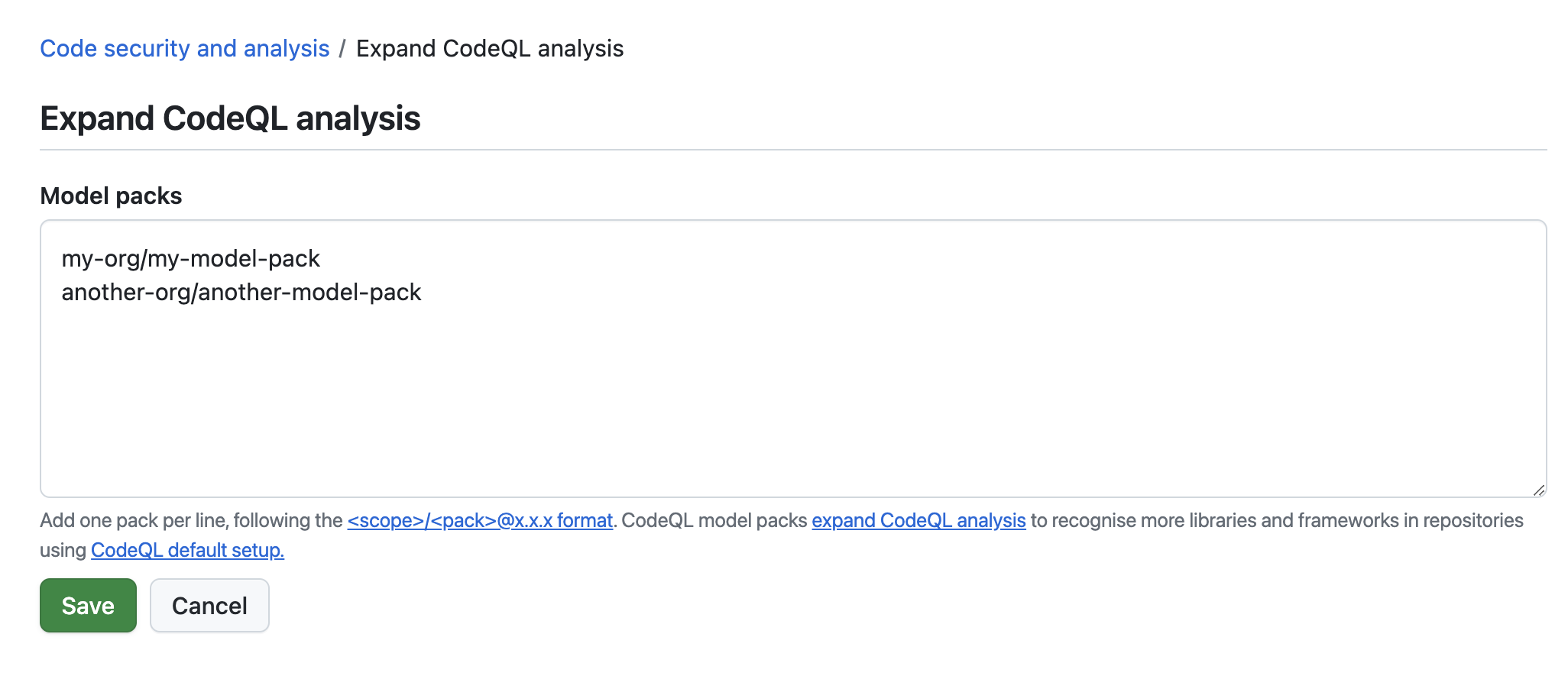
-
The model packs will be automatically detected and used when code scanning runs on any repository in the organization with default setup enabled.


Further customization
If you need to change any other aspects of your code scanning configuration, consider configuring advanced setup. See Configuring advanced setup for code scanning.